
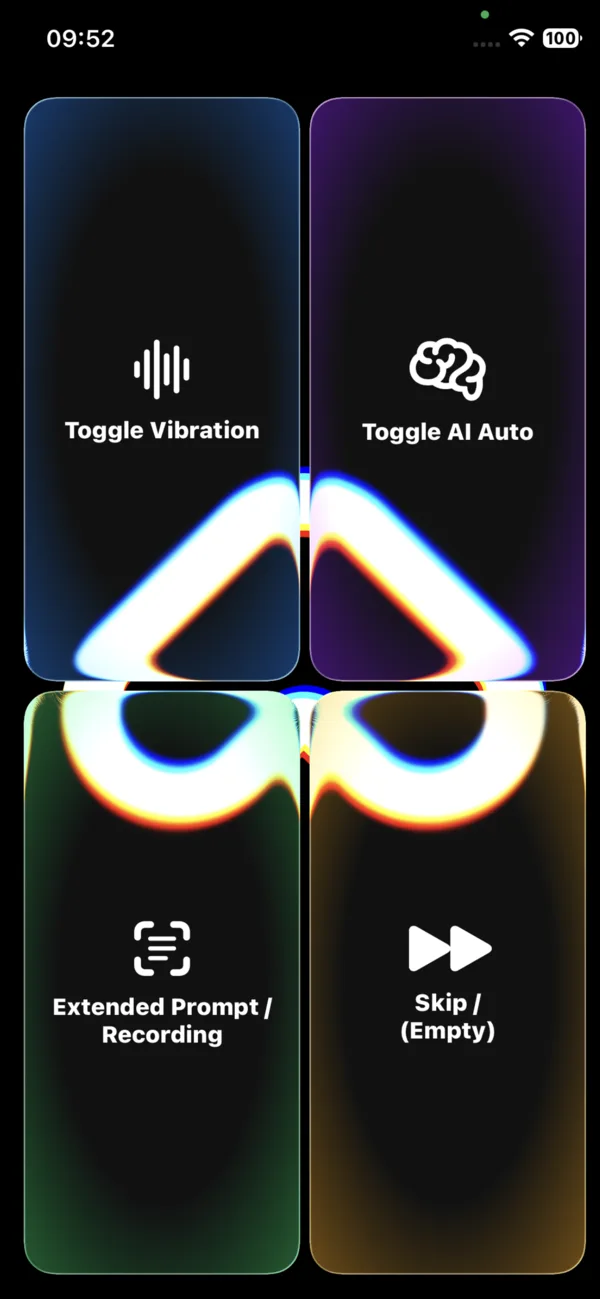
Quattro pulsanti, zero complicazioni
La schermata è sempre la stessa, così ricordi in fretta dov'è ogni cosa. Ogni angolo è una funzione. Continua a scorrere e li metteremo in evidenza uno per uno.
Ariadne Sense è un'unica schermata semplice con quattro grandi pulsanti. Scorri per conoscerli uno a uno: che cosa fanno con un tocco, con la pressione prolungata e in che cosa ti aiutano.
La schermata è sempre la stessa, così ricordi in fretta dov'è ogni cosa. Ogni angolo è una funzione. Continua a scorrere e li metteremo in evidenza uno per uno.
Attiva o disattiva la vibrazione.
Il telefono vibra tanto più forte quanto più sei vicino a un ostacolo. Sotto la soglia di sicurezza inizia a pulsare. È più preciso su un iPhone con sensore LiDAR.
Quando vuoi percepire gli ostacoli senza ascoltare messaggi vocali: in movimento, nel rumore o insieme alla descrizione dell'AI.
Attiva o disattiva la modalità automatica.
L'app rileva da sola che la scena davanti a te è cambiata e descrive ciò che ti circonda ad alta voce, senza che tu lo chieda.
Durante una passeggiata e ovunque tu voglia una consapevolezza continua dell'ambiente senza dover chiedere di continuo.
Una descrizione dettagliata e più lunga di ciò che hai davanti, inclusa la lettura del testo ad alta voce.
Registra la tua domanda a voce. Rilascia per inviarla e ascoltare la risposta.
Quando vuoi chiedere di qualcosa di preciso, leggere un documento o domandare «che cosa ho in mano?».
Interrompe la lettura o la risposta in corso e ti lascia proseguire.
Ferma subito la voce, quando l'informazione non serve più.
Quando hai già sentito quello che volevi e non vuoi aspettare il resto.
Quattro pulsanti ti danno accesso a tutta la potenza di Ariadne Sense. Del resto, cioè della fotocamera, dei sensori e dell'intelligenza artificiale, si occupa l'app.